
Do you have an FNB account? Now you can effortlessly pay your DStv account or top up your BoxOffice via the banking app, online banking or with cellphone banking. With the Real Time Activation service, your account can be activated immediately after payment is received.
With an FNB transactional account you can manage your DStv monthly subscription or pay for another DStv subscriber. All three banking methods (app, online or cellphone) puts you in charge of your spending. You can check your balance anytime. You can also top up your BoxOffice account to continue enjoying blockbuster movies in the comfort of your home.
How to Pay Your DStv Subscription with Your FNB Account
- If you do not have it then download the FNB banking app.
- Login to the FNB App

- Click On “Payments” tab

- Select “Add Recipient/Bill”
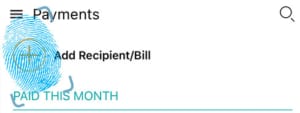
- Select Public Recipient

- Type the first three letters of the recipient. eg “DSTV”, “Multichoice” or “BoxOffice”
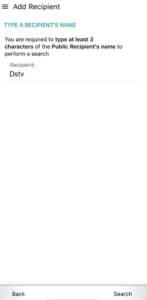
- Select the appropriate recipient

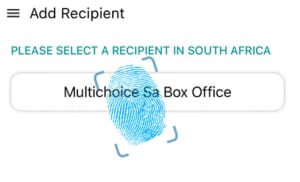
- Complete the details for the recipient

- Use either your Customer Number or Smartcard Number as the beneficiary reference.
To make a payment to DStv on the FNB app
- Click On “Payments” tab
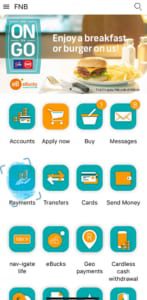
- Select “Pay Recipients”
- Select the applicable recipient eg ‘DSTV” or “BoxOffice”

- Specify amount and confirm.
For cellphone banking, dial *120*321#
Select 5 (PayTV) and follow the step by step instructions
Who Qualifies for This Service?
If you have an active FNB transactional account, FNB Debit or Credit Card, you can activate this handy service. You must register for online or cellphone banking to use this service. Or you can use the latest version of the FNB App.

