We know you have loads to do on your to-do list and paying for your DSTV should be the last thing to do. Luckily, paying your DStv account doesn’t have to be one of them with debit order.
SMS debit to 37171
That’s if you set up a debit order. Simply SMS debit to 37171 and we’ll call you back to get you started.
(SMS costs R1 in South Africa)
Visit DSTv.com
You can also easily activate it via your credit card account.
Visit dstv.com and click on My DStv for more info.
Cut the queues and avoid re-connection fees.
Do quick. Do easy. Do reliable. Do it the debit order way.
And consider it done with DStv!
https://localdstvinstaller.co.za/wp-content/uploads/2018/10/DSTV-Self-Service-Choose-Debit-Order_.jpg454803LocalDSTVhttps://localdstvinstaller.co.za/wp-content/uploads/2018/02/no-300x141.pngLocalDSTV2018-10-03 15:44:202019-04-11 10:54:03Choose Debit Order
Not seeing the bigger picture? Or perhaps your screen looks stretched. Maybe you prefer to watch without those black bars. It’s super easy to set your DStv decoder to your specific viewing preferences.
If you have an older model decoder
Step 1- press the menu button on your remote.
Step 2- Select the advanced options,
Step 3- Then television installation.
Step 4- Enter 9949 and select the aspect ratio that’s right for you.
On our HD PVR
Step 1- Press the shift and TV guide button.
Step 2- Keep pressing them until you find the setting that you prefer.
For the DStv Explora decoder, and the DStv HD decoder
Step 1- Press the ARC button once to display the current aspect ratio setting.
Step 2- Then keep pressing to cycle through the various options.
Remember to make sure that your wide screen television isn’t set to automatically adjust your picture, as this will conflict with your decoder setting.
https://localdstvinstaller.co.za/wp-content/uploads/2018/10/DSTV-Self-Service-How-to-change-Aspect-Ratio_.jpg454804LocalDSTVhttps://localdstvinstaller.co.za/wp-content/uploads/2018/02/no-300x141.pngLocalDSTV2018-10-03 13:32:072019-04-02 16:21:13How to change Aspect Ratio
DStv Now is the internet-based service of the popular subscription service. You can watch all your favourite content – from live TV and sports, to series and shows, plus Catch Up – on your preferred internet-enabled device.
Beside smartphones and tablets, you can now access the app on Apple TV. The app was launched in 2014, with the initial focus on being a mobile-first product. But it grew in popularity so quickly, that DStv decided to expand the access options. A big appeal of the app is watching DStv without the need of a decoder.
DStv Now is free to all DStv customers. The content you can watch online is linked to your DStv package. You can watch different shows in the same house, without fighting over the remote. One account can be linked to the main decoder in your lounge, and simultaneously give you access to a movie on your tablet in the bedroom. You can link as many devices as you want. A bonus feature of this, is offering your kids access to your DStv subscription away from home.
DStv Now is an over-the-top (OTT) internet video streaming service. It works best with a good high-speed internet connection, ideally uncapped.
How to Connect Your Apple TV with DStv Now
Download the app from the Apple App store. Open the DStv Now App on your Apple TV.
A pin will be placed on your TV. Access your MacBook, iPad or iPhone and go to now.dstv.com/tv to link your Apple TV. Register to watch the best in DStv entertainment. Verify your phone number to complete registration.
An OTP will be sent to your iPhone. Enter the One Time Pin sent to your phone. Enter your personal information and click Finish. Enter the Pin displayed on your TV.
Your Apple TV is now linked to DStv Now! Go back to your TV and start watching your favourite shows.
https://localdstvinstaller.co.za/wp-content/uploads/2018/09/dstv-now-.jpg3411024LocalDSTVhttps://localdstvinstaller.co.za/wp-content/uploads/2018/02/no-300x141.pngLocalDSTV2018-09-27 14:56:052019-04-03 09:51:10Get DStv Now on your Apple TV
Option 2- Or dial *120*68584# and select option 3 (clear my error)
Option 3- You can also visit dstv.com and go to Support and click on Fixing Errors
Keep your decoder switched on with the smartcard inserted so that it can receive the reset command after you have paid.
Quick and easy self-service with DStv!
https://localdstvinstaller.co.za/wp-content/uploads/2018/09/My-DStv-–-Quick-and-Easy-Tip-to-Fix-Your-Errors_.jpg452784LocalDSTVhttps://localdstvinstaller.co.za/wp-content/uploads/2018/02/no-300x141.pngLocalDSTV2018-09-26 11:11:222019-04-11 11:15:16My DStv – Quick and Easy Tip to Fix Your Errors
Step 2- Go to the My DStv tab. Step 3- Click on Set up debit order and follow the step by step instructions.
Switch to quick, easy, and hassle-free payment with a debit order.
https://localdstvinstaller.co.za/wp-content/uploads/2018/09/My-DStv-–-Fast-and-Hassle-Free-Debit-Order_.jpg424815LocalDSTVhttps://localdstvinstaller.co.za/wp-content/uploads/2018/02/no-300x141.pngLocalDSTV2018-09-26 11:07:282019-04-11 11:50:20My DStv – Fast and Hassle-Free Debit Order
Bad weather can put a damper on your day. And it can also affect your television signal because the signal is send via satellite. A local storm or even a storm across the world, can affect your signal.
If you have a PVR decoder, why not check out DStv Catch Up or choose something from your playlist to watch? If you don’t have PVR, you can catch-up or rent online and wait for the storm to pass.
Remember to unplug your decoder if there is lightning about. The common reasoning holds that a lightning strike could send a surge of electricity through household wiring, destroying electric devices and circuits.
DStv – great viewing to help you weather any storm!
https://localdstvinstaller.co.za/wp-content/uploads/2018/09/Bad-weather-interrupts-TV-viewing_.jpg452790LocalDSTVhttps://localdstvinstaller.co.za/wp-content/uploads/2018/02/no-300x141.pngLocalDSTV2018-09-26 11:05:512019-04-12 10:42:11Bad weather interrupts TV viewing
https://localdstvinstaller.co.za/wp-content/uploads/2018/09/My-DStv-–-Where-and-How-to-Pay_.jpg437804LocalDSTVhttps://localdstvinstaller.co.za/wp-content/uploads/2018/02/no-300x141.pngLocalDSTV2018-09-25 15:29:472019-03-29 09:19:50My DStv – Where and How to Pay
https://localdstvinstaller.co.za/wp-content/uploads/2018/09/Pay-DSTV-On-FNB-App-Multichoice-Public.jpg330489LocalDSTVhttps://localdstvinstaller.co.za/wp-content/uploads/2018/02/no-300x141.pngLocalDSTV2018-09-22 10:58:052019-03-25 14:42:07How to Pay DStv using FNB App – Account payments made easy with FNB and DStv
https://localdstvinstaller.co.za/wp-content/uploads/2018/09/How-to-cast-DStv-Now-from-your-Android-Device-to-Google-Chromecast.jpg445819LocalDSTVhttps://localdstvinstaller.co.za/wp-content/uploads/2018/02/no-300x141.pngLocalDSTV2018-09-22 10:52:312019-03-29 11:33:36How to cast DStv Now from your Android Device to Google Chromecast
Download the DStv Now app to start enjoying entertainment on the move. Watch your favorite shows and channels wherever and whenever . (all you need is a good internet connection and you are god to go)
DStv in Your Pocket
After downloading the app, follow these instructions:
Step 1- Tap on the DStv Now icon to open the app.
Step 2- Register or login
Step 3- Enter the one-time PIN that was sms’ed or emailed to you.
Step 4- Fill in more details including your name, email and password
https://localdstvinstaller.co.za/wp-content/uploads/2018/09/How-to-start-using-DStv-Now.jpg453805LocalDSTVhttps://localdstvinstaller.co.za/wp-content/uploads/2018/02/no-300x141.pngLocalDSTV2018-09-13 14:47:022019-05-09 10:56:12How to start using DStv Now
https://localdstvinstaller.co.za/wp-content/uploads/2018/09/How-to-link-your-smartcard-to-DStv-Now.jpg450793LocalDSTVhttps://localdstvinstaller.co.za/wp-content/uploads/2018/02/no-300x141.pngLocalDSTV2018-09-13 14:26:232020-07-01 09:25:26How to link your smartcard to DStv Now
https://localdstvinstaller.co.za/wp-content/uploads/2018/09/DStv-Self-Service-Download-Account-Statements.jpg7201280LocalDSTVhttps://localdstvinstaller.co.za/wp-content/uploads/2018/02/no-300x141.pngLocalDSTV2018-09-05 10:55:312019-03-31 00:37:48View your DStv account statements – It’s easy with DStv Self Service
https://localdstvinstaller.co.za/wp-content/uploads/2018/09/DSTV-E16-Error-Message-1.jpg363800LocalDSTVhttps://localdstvinstaller.co.za/wp-content/uploads/2018/02/no-300x141.pngLocalDSTV2018-09-05 10:53:482019-06-28 13:44:50Fix E16 Errors on DStv – It’s easy with DStv Self Service
Take the hassle out of paying your DStv account by switching from cash or EFT payment, to debit order. Never worry about missing a payment again!
What is a debit order?
You can give MultiChoice permission to deduct your monthly subscription fee automatically from your bank account. This function is setup electronically for payment collection every month.
Debit Order Benefits
By setting up a debit order for your monthly DStv subscription, you will never miss a payment again.
It’s a hassle-free way to stay connected to DStv, with an easy and convenient payment method. Switch from manual payment to automatic.
Also, you can trace your DStv subscription payments via your bank statement, with your debit order being deducted on the same day each month. Effortlessly keep track of your payment history and stay in charge of your spending.
How to Setup a Debit Order with DStv
There are a few different ways to setup your debit order.
Option 1- Online via DStv Self Service
Do you bank with the following South African banks? Capitec, FNB, Standard Bank, Nedbank, or Absa. If so, and your DStv account plus bank account are both registered in your name, you can set up your debit order from the self-service menu.
Step 1- Click on the Menu button, followed by the Manage option.
Step 2- Click on My Account and Setup/Manage Debit order.
You will need to go through a verification process to confirm that your bank account belongs to you. The process can be completed automatically if both your DStv and bank account are registered in your name. If not, you will have to follow one of the other options listed below.
Option 2- Via Email or Fax
If your bank is not one of the major South African banks, you need to send through proof of banking (bank statement, bank-stamped letter, or cancelled cheque) to DStv.
If your company will be paying for your personal MultiChoice account, you need to take the following original documents to a MultiChoice branch or agency:
Letter on the company’s corporate letterhead
Authorisation stated that the company will be managing the payment
Company’s banking details stated on the letter
Letter signed by a company representative (name, position and contact information)
https://localdstvinstaller.co.za/wp-content/uploads/2018/08/Easy-way-to-pay-your-DStv-account-by-switching-to-a-Debit-Order.jpg417786LocalDSTVhttps://localdstvinstaller.co.za/wp-content/uploads/2018/02/no-300x141.pngLocalDSTV2018-08-29 11:09:232019-03-29 11:09:39Easy way to pay your DStv account by switching to a Debit Order
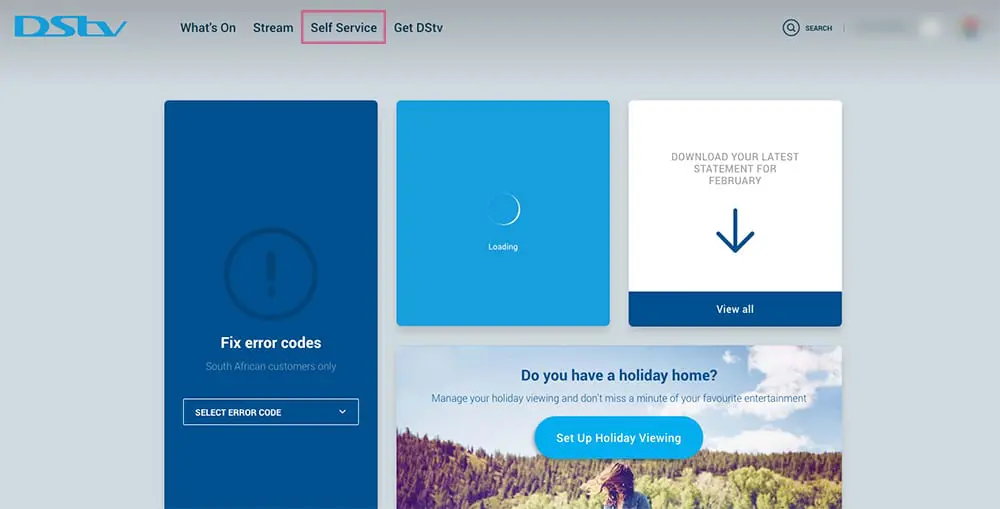
If you are not logged in already, log in. If you have not registered before then register with DStv Self Service first. You will log in with your Connect ID using either an email address or mobile phone number.
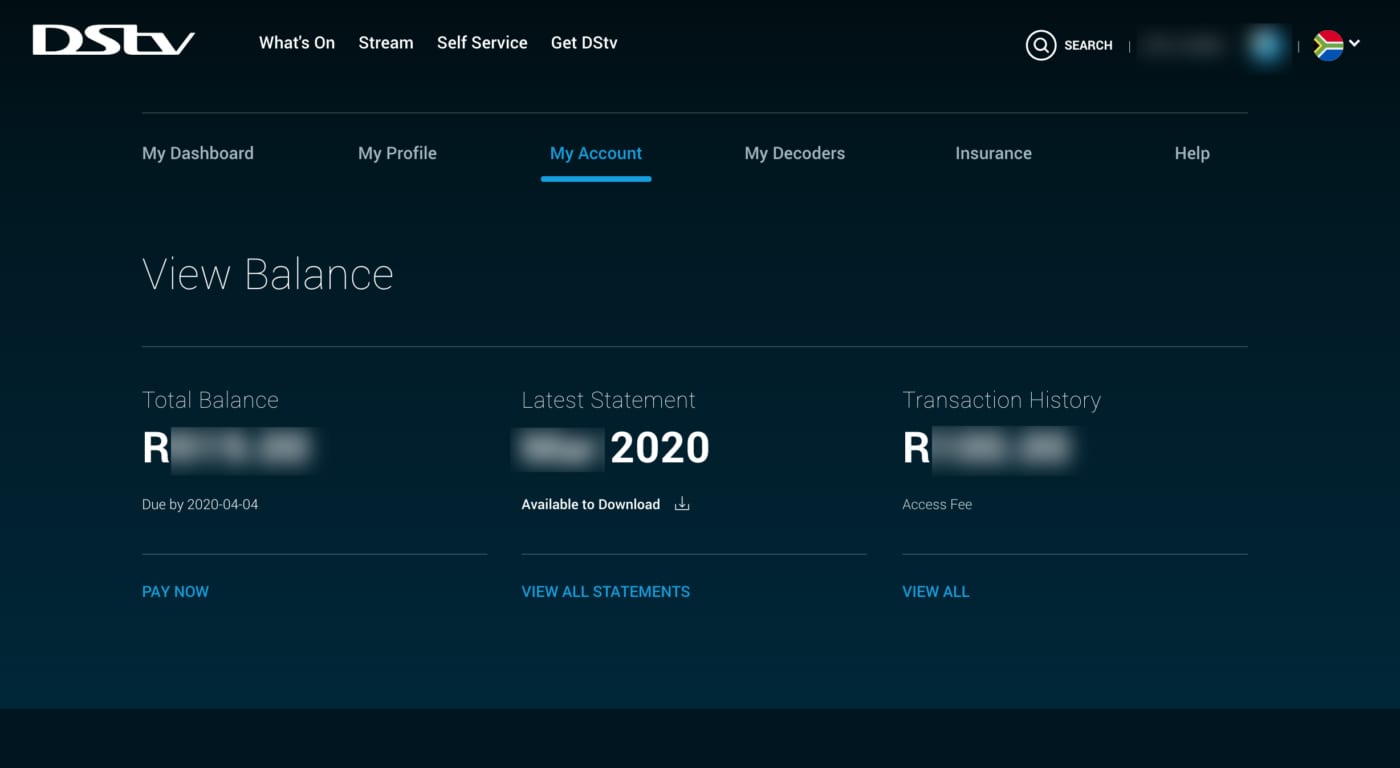
View Your DStv Balance
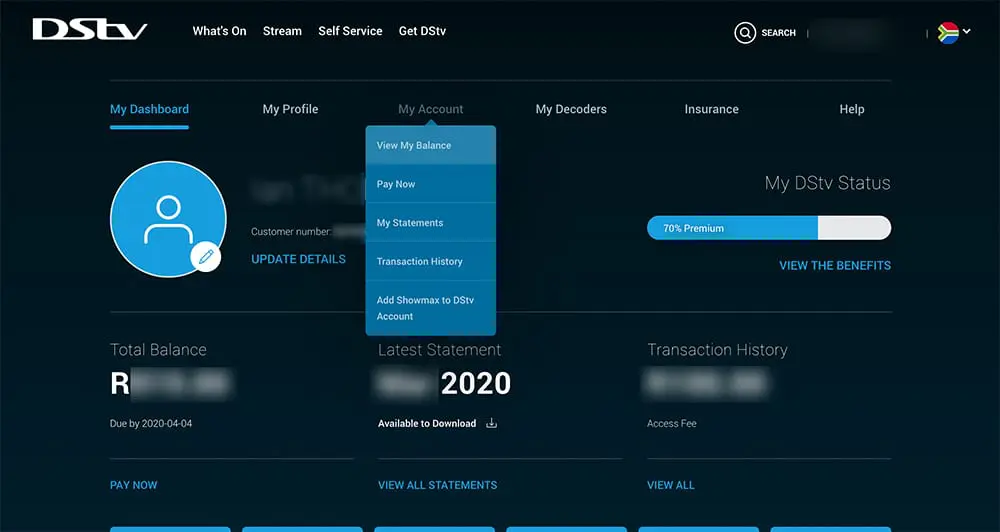
Once logged in you will be able to see your DStv balance on your dashboard, with the option to pay now. Just like the image below.
If you want a more detailed breakdown of your balance including your BoxOffice balance then:
From your DStv dashboard Click the “My Account” tab from the top menu ( 2nd menu from the top ).
Choose “View My Balance” from the drop down menu.
You will be redirected to view your balance where you can choose an option for how to pay DSTV.
If you are trying to fix an E16 error message remember to keep your decoder switched on, with the smart card inserted so that it can receive the reset command after you’ve paid and allow for reactivation.
https://localdstvinstaller.co.za/wp-content/uploads/2018/08/How-to-check-your-DStv-Balance-and-Pay-Onlne-DStv-Self-Service.jpg7201280LocalDSTVhttps://localdstvinstaller.co.za/wp-content/uploads/2018/02/no-300x141.pngLocalDSTV2018-08-29 10:41:222020-04-18 17:58:36How To Check Your DStv Account Balance With DStv Self Service
NMS Insurance Services offers a special a short-term insurance policy to MultiChoice. They are the authorised FSP for DStv Decoder Insurance. One serialised decoder is linked to each insurance policy. If you have multiple decoders, you need to insure each one separately.

How to Activate Your NMS Insurance Policy for a DStv Decoder
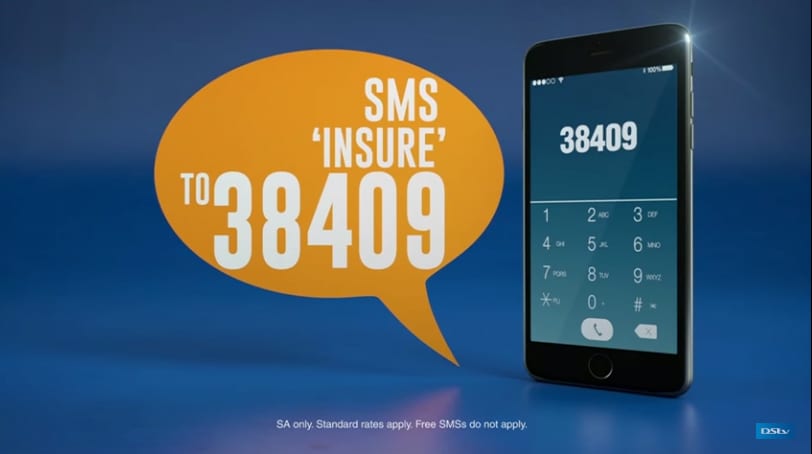
There are a few different ways to set up your insurance policy:
Visit the interactive menu on your decoder and follow the prompts.
The monthly short-term insurance contract covers the following issues:
Electrical or mechanical malfunction
Lightning, fire, explosion, or flood
Loss due to theft
Insurance Policy Criteria
The policy is only valid for South African, MultiChoice-approved serialised decoders. It excludes damage caused by abuse, misuse, or negligence. You can only lodge a fault claim 3 months after activation of the decoder insurance.
https://localdstvinstaller.co.za/wp-content/uploads/2018/08/Insure-your-DStv-decoder-and-safeguard-your-Premium-entertainment_.jpg488900LocalDSTVhttps://localdstvinstaller.co.za/wp-content/uploads/2018/02/no-300x141.pngLocalDSTV2018-08-23 09:57:032019-04-16 14:02:08Insure your DStv decoder and safeguard your Premium entertainment
NMS Insurance Services offers a special a short-term insurance policy to MultiChoice. They are the authorised FSP for DStv Decoder Insurance. One serialised decoder is linked to each insurance policy. If you have multiple decoders, you need to insure each one separately. It’s quick, easy & it could save you money.

How to Activate Your NMS Insurance Policy for a DStv Decoder
There are a few different ways to set up your insurance policy:
Option 1- Visit the interactive menu on your decoder and follow the prompts.
Option 2- Visit DStv.com and sign-in with your connect ID
The monthly short-term insurance contract covers the following issues:
Electrical or mechanical malfunction
Lightning, fire, explosion, or flood
Loss due to theft
Insurance Policy Criteria
The policy is only valid for South African, MultiChoice-approved serialised decoders. It excludes damage caused by abuse, misuse, or negligence. You can only lodge a fault claim 3 months after activation of the decoder insurance.
https://localdstvinstaller.co.za/wp-content/uploads/2018/08/DStv-Decoder-Care-Insurance-for-Compact-Subscribers_.jpg414809LocalDSTVhttps://localdstvinstaller.co.za/wp-content/uploads/2018/02/no-300x141.pngLocalDSTV2018-08-23 09:51:492019-04-02 16:04:45DStv Decoder Care Insurance for Compact Subscribers
If you are a Nedbank account holder, you don’t have to wait in line to pay your DSTv. You can conveniently pay your DStv account with My eBills™. Or top up your BoxOffice movies account. Pay your bills electronically quick and easily after online registration.
Payments Made Easy with Digital Channels
After you subscribe you can manage your accounts online. Instead of waiting for your bill to arrive in the mail, you can manage your DStv subscription online. You can also view account balances in real time. Reduce account errors by staying in control of your accounts. Plus, you can pay multiple bills at the same time, in one place.
Step 3- Select the Subscribe option and the institution you want to link to
Step 4- Pick the Pay Bills option
Step 5- Scroll through the list of your subscribed bills, select the institution you want to pay
Step 6- Submit payment
Institutions Linked to My eBills™
DStv (Subscription and Box Office)
SABC
Grit Procurement
City of Tshwane Metropolitan Municipality
Ekurhuleni Metropolitan Municipality
Mangaung Metropolitan Municipality
uMhlathuze Local Municipality
City of Matlosana Municipality
Traffic fines (AARTO and City of Cape Town)
https://localdstvinstaller.co.za/wp-content/uploads/2018/08/Accounts-payments-with-DStv-and-BoxOffice-made-easy-with-Nedbank-Internet-Banking.png447805LocalDSTVhttps://localdstvinstaller.co.za/wp-content/uploads/2018/02/no-300x141.pngLocalDSTV2018-08-22 11:01:212019-05-09 11:25:55Accounts payments with DStv and BoxOffice made easy with Nedbank Internet Banking
With DStv Now, you can watch your favourite shows at any time, from anywhere. All you need to do, is download the DStv Now app and access it from your smartphone or tablet. It’s like a PVR in your pocket!
Great Features
You can access high-quality live TV as well as Catch Up content – anytime, from anywhere. Access the live stream option to enjoy a variety of the best DStv channels, including SuperSport and movies. Use the handy 8-day TV Guide to plan your viewing.
With DStv Catch Up you can either stream or download the latest episode of your favourite shows. If you are a South African subscriber, you can schedule a remote recording on your internet-connected DStv Explora.
All you need is a good internet connection, and you can watch live TV or access the latest Catch Up content from your computer, laptop, as well as an Android/iOS tablet or smartphone.
https://localdstvinstaller.co.za/wp-content/uploads/2018/08/How-to-get-free-DStv-Now-included-in-your-subscription-for-DStv-Family-DStv-Access-DStv-EasyView.png410900LocalDSTVhttps://localdstvinstaller.co.za/wp-content/uploads/2018/02/no-300x141.pngLocalDSTV2018-08-22 10:43:462019-05-13 10:48:17How to get free DStv Now included in your subscription for DStv Family, DStv Access & DStv EasyView
Are you a DSTV fanatic? We got great news, you can now keep watching DStv wherever you are with the new DStv Now app. Stream live television online from your phone, tablet, or computer! The app is free and is available to the following DStv packages: Premium, Compact, Compact Plus, Family, Access and EasyView.
Stream live channels, movies, and series, or download it to watch later in the comfort of your own home or destination. To start watching online, register on now.dstv.com or activate via the app.
DStv Now offers you access to more than 60 DStv channels. Watch your favourites on the go like Mzansi Magic, kykNET, and SuperSport. The movie and series box sets are a great way to keep yourself entertained when away from home.
If you have kids don’t worry, the DStv Now app has a dedicated Kids section that makes it super easy to ensure that your kids have a safe and fun viewing experience. Download the DStv Now app for your mobile device from either the Google Play Store or Apple App Store to get started with the fun, family-friendly entertainment.
Please note: the app uses data for streaming and downloading.
https://localdstvinstaller.co.za/wp-content/uploads/2018/08/Login-and-Register-with-DSTV-Now-app.jpg422809LocalDSTVhttps://localdstvinstaller.co.za/wp-content/uploads/2018/02/no-300x141.pngLocalDSTV2018-08-16 17:21:452019-03-29 08:40:44How to register and login with the DSTV Now App
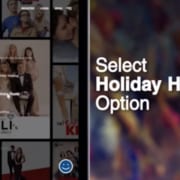
Are you planning to travel to your holiday home and want to take your DStv decoder with? There are a few options you can consider to do this. Use the self-service platforms for instructions. Or follow the steps below
Step 3- Facebook: @DStvSelfService (send a message via Facebook Messenger)
Visit the DStv Self Service website to remove your decoder from the XtraView set-up. This is a great option if you have more than one decoder.
If you are a Price Lock customer you can choose from the following options.
Switch off the main home decoder and switch on the holiday home decoder. This will be a like-for-like switch, keeping you on the same DStv package.
Option 2:
Activate both your main and holiday home. This option is available via the DStv Self Service website. You must indicate which decoder will be your holiday home decoder on the My DStv function.
Make sure your holiday home has the right installation for the Catch Up and BoxOffice functions to work. You can also use DStv Now to stream live channels, and stream or download DStv Catch Up content to your tablet or smartphone. The app is free to download on the Google Play Store or Apple App Store and is available to all DStv customers, with live streaming channels and Catch Up content linked to the specific package of the customer.
https://localdstvinstaller.co.za/wp-content/uploads/2018/08/how-to.jpg450805LocalDSTVhttps://localdstvinstaller.co.za/wp-content/uploads/2018/02/no-300x141.pngLocalDSTV2018-08-16 16:46:372019-05-13 11:14:11How to activate DStv for your holiday home and your home paying via Debit Order
Travelling to your holiday home and want to take your DStv decoder with? There are a few options you can consider to do this. Use the self-service platforms for instructions. Or follow the steps below
Facebook: @DStvSelfService (send a message via Facebook Messenger)
Visit the DStv Self Service website to remove your decoder from the XtraView set-up. This is a great option if you have more than one decoder.
If you are a Price Lock customer you can choose from the following options.
Option 1:
Switch off the main home decoder and switch on the holiday home decoder. This will be a like-for-like switch, keeping you on the same DStv package.
Option 2:
Activate both your main and holiday home. This option is available via the DStv Self Service website. You must indicate which decoder will be your holiday home decoder on the My DStv function.
Make sure your holiday home has the right installation for the Catch Up and BoxOffice functions to work. You can also use DStv Now to stream live channels, and stream or download DStv Catch Up content to your tablet or smartphone. The app is free to download on the Google Play Store or Apple App Store and is available to all DStv customers, with live streaming channels and Catch Up content linked to the specific package of the customer.
https://localdstvinstaller.co.za/wp-content/uploads/2018/02/no-300x141.png00LocalDSTVhttps://localdstvinstaller.co.za/wp-content/uploads/2018/02/no-300x141.pngLocalDSTV2018-08-16 16:36:362018-08-16 16:36:36How to switch DStv on for your holiday home and turn off DStv at your main home